TwentyTwenty
A cross-platform desktop app that enforces the 20-20-20 eye strain rule by measuring genuine screen time, not by running a timer.
Builds are unsigned, because code signing certificates cost money this project does not spend. Windows will show a SmartScreen prompt (More info, then Run anyway) and macOS needs one command to clear the quarantine flag. The README covers both.
Overview
A tray app that interrupts you every 20 minutes of actual screen use, and knows the difference between you being at your desk and you being gone.
Every 20 minutes, look at something 20 feet away for 20 seconds. That is the whole rule, and almost every app that implements it gets it wrong in the same way: it sets a repeating 20 minute alarm and calls it done. That app will interrupt you during lunch, during a meeting, and thirty seconds after you sat back down from a long break.
TwentyTwenty measures screen time instead of wall clock time. It reads how long it has been since you touched the keyboard, and whether anything is holding your display awake, which is what every video player does while it plays. Those two signals together tell it whether you are actually looking at a screen. Walk away and the counter stops. Watch a film without touching anything and it keeps counting, because your eyes are still working.
Why It Matters
Digital eye strain is not a myth and it is not vanity. It is a mechanical problem with a mechanical fix.
Focusing on something close requires active muscular work. A ring of muscle inside your eye contracts to thicken the lens and hold near focus, and it stays contracted for as long as you keep looking at your screen. Hold any muscle in one position for hours and it fatigues. That is the ache behind your eyes at the end of a working day, and it is why the discomfort eases within minutes of looking out a window.
The second half is blinking. People blink markedly less while concentrating on a screen than during ordinary conversation, and incomplete blinks become more common. Blinking is what resurfaces the tear film that keeps the front of your eye optically clear, so blinking less leaves it patchy. That is the grittiness, the burning, and the blur that clears for a second when you finally blink hard.
Twenty feet is not arbitrary. Beyond roughly that distance the light reaching your eye is close enough to parallel that the lens can relax to near its resting state. Closer targets still demand work. Twenty seconds is roughly how long the muscle needs to actually let go rather than briefly loosen, and looking away without waiting is most of why people feel the rule does nothing for them.
None of this causes permanent damage, which is exactly why it goes unaddressed. It just quietly makes every afternoon worse. The fix costs twenty seconds and the only hard part is remembering, which is a job for software.
The Problem With Timers
A repeating alarm is not a reminder, it is an interruption that happens to be periodic.
The requirement that shaped this project was stated plainly at the start: it should not be a masked simple 20 minute reminder. That constraint rules out the easy implementation and forces a real question. What counts as screen time?
A plain timer has no idea whether you are there. It fires while you are in the kitchen, and its counter is already half spent when you return, so it fires again almost immediately. Users learn within a day that the prompt carries no information, and they start dismissing it reflexively. An eye strain reminder that gets reflexively dismissed is worse than none, because it consumes attention and returns nothing.
Count real use
Screen time accrues only while you are actually at the machine. Step away and the counter holds.
Credit real breaks
An absence of two minutes or more counts as a break and clears the counter. Coming back from lunch does not earn you an immediate interruption.
Never ambush
The overlay refuses to appear while you are presenting or screen sharing, and defers until it is safe.
Measuring Real Screen Time
Two signals, one rule, and the one insight the whole product rests on.
Every operating system will tell you how long it has been since the user last touched an input device. That single number gets you most of the way, and it is what a naive implementation would stop at. It has one serious hole: watching a video means sitting perfectly still. Pure idle detection concludes you left the room, stops counting, and the feature fails precisely when your eyes are working hardest.
The fix came from asking what a video player does that a screensaver would otherwise interrupt. It asks the operating system to keep the display awake. That request is readable, on every platform, without special permission. So the rule becomes: you are at the screen if you gave input recently, or if something is holding your display awake.
This was verified before any of it was built. A probe ran for two minutes while a video played and the keyboard went untouched. The idle counter climbed past 89 seconds without a break while an inhibition from the browser stayed visible the entire time. A plain idle check would have declared the user gone after 60 seconds. The measurement proved the product was possible, and it took twenty minutes.
It also exposed a limitation that shipped, documented rather than hidden. The signal for a playing video is indistinguishable from the signal for background music. Two candidate filters were tested against real data and both failed, one of them by breaking the exact case that proves the feature works. So leaving music on while you walk away will keep the counter running. That is a real cost of the approach and the app says so in its README rather than pretending otherwise.
The Break Itself
Insistent enough to work, escapable enough to keep.
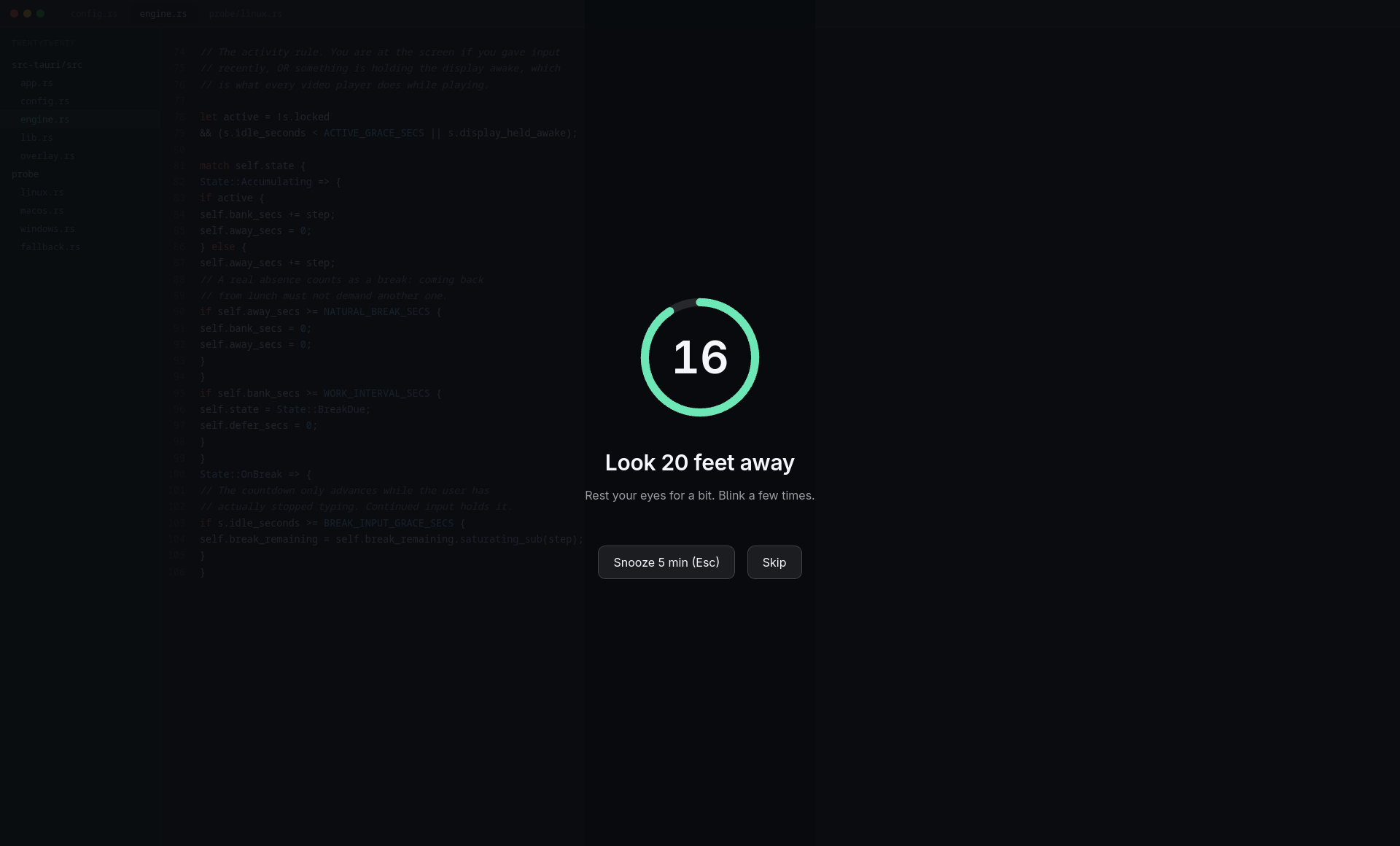
When the twenty minutes are spent, a dimmed overlay covers every monitor. It is deliberately see-through, so your work stays faintly visible behind it and the interruption reads as a pause rather than a takeover.
The countdown has one unusual property: it only advances while you have actually stopped. Keep typing and it holds, showing a quiet hint rather than counting down to nothing while you ignore it. A twenty second timer you can type through is decoration. Escape snoozes for five minutes, Skip resets the full interval, and both exist because an app you cannot dismiss during a crisis is an app you uninstall.
Snooze is measured in active minutes, not wall clock minutes, for the same reason the main interval is. Snoozing and then walking away should not burn the snooze.
The break overlay over an editor. The dim is transparent by design, so the work underneath stays visible.
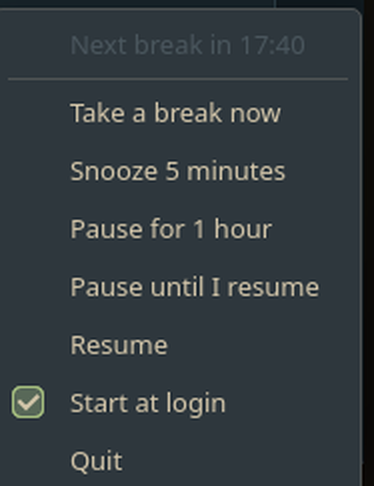
Between breaks the app is a tray icon and nothing else. Right-clicking it shows a live countdown to the next break alongside the controls, which turned out to be the only way to surface it: the tray backend on KDE Wayland exposes no tooltip property at all, so the hover text the app sets is silently discarded there.
One App, Three Operating Systems
Every platform reduces to the same four facts, and the logic never learns which one it is running on.
The three operating systems expose this information through completely unrelated interfaces. Linux needs a Wayland protocol and a DBus property. Windows has two Win32 calls. macOS has a Core Graphics function and a command line tool. Left unchecked, that difference spreads through a codebase until every feature has three versions.
Instead, each platform implements one small file that answers four questions. How long since input? Is something holding the display awake? Is the user presenting? Is the session locked? Everything above that boundary is platform agnostic and never branches on the operating system.
Linux
Idle from the ext-idle-notify Wayland protocol, inhibitions and lock state over DBus. The only platform fully verified by hand.
Windows
GetLastInputInfo for idle, the shell notification state for fullscreen and presentation, desktop access for lock detection.
macOS
Core Graphics for idle and power assertions for display wake, read through pmset rather than raw FFI for legibility.
Fallback
If any platform probe fails at runtime the app degrades to input-idle only rather than propagating a bad reading.
That boundary earned its keep during development. The Linux idle source the plan called for turned out not to exist on the target compositor, and replacing it touched exactly one file. Nothing above it changed.
Proving It Works
How do you test twenty minute behavior without waiting twenty minutes?
The decision that made this project testable was keeping the engine pure. It never reads a clock and never touches the operating system. Time arrives as a number, and readings arrive as plain data. Everything interesting lives there: the counter, the break rule, snooze arithmetic, deferral while presenting, and what happens when a laptop lid closes.
Because none of it does any real work, a full twenty minute interval runs in microseconds against synthetic input. So the test suite asserts the actual product requirements by name. A video with no input still accumulates. A real absence clears the counter. A locked session never counts. The countdown completes only when input stops. An hour of sleep counts as rest, not as an hour of staring.
Two questions were too risky to assume, so both were answered before any real code was written. Would the compositor allow a fullscreen always-on-top overlay at all? Does a playing video really register as holding the display awake? Both were settled by throwaway probes in an afternoon. If the second one had come back negative, the entire product concept would have needed rethinking, and it would have been better to learn that on day one than at the end.
What The Process Caught, And What It Missed
Nine defects found before release. The one that mattered most got through anyway.
The interesting failures were not the ones the tests caught. They were the ones that passed everything and were still broken.
The app quit forever after the first break. This is a tray app that opens no window at startup, and the framework treats zero open windows as an instruction to exit. So the moment the first break overlay closed, the process ended. A user would have installed it, received exactly one reminder, and watched it vanish from the tray permanently. No test detects this. It was found by running the app and instrumenting the event loop.
The overlay was completely invisible. The fade-in set transparency on both the document and the body element but only ever restored it on one of them. Opacity multiplies down the tree, so the result was a fullscreen window that rendered nothing while still swallowing every click. Every automated signal was green: the window was created, events flowed, the keyboard shortcut worked, 35 tests passed. The bug surfaced when a human looked at the screen and reported that something kept covering it with nothing on it.
The rest were ordinary but would have shipped: an idle check that would have downgraded itself to a dumb timer the first time the user touched the mouse, a session lookup that fails specifically when the app is launched at login, a macOS parser that would have reported the display permanently awake, and a wrong Win32 call for closing a handle.
And then one got out. On a packaged build the overlay came up completely blank and swallowed the keyboard and mouse with it. Every control that dismisses it lives in that page, so when the page failed to draw, Escape, Snooze and Skip ceased to exist at the same moment. There was no way out of the session.
The first fix addressed the cause: a build that resolved the page against a development server that is not running in a shipped app. It was the right diagnosis, it was verified, and it was not enough. Within the hour the same symptom returned from an unrelated cause. The AppImage carries its own graphics libraries, and against a driver that disagrees with them the renderer dies before its first frame. Same blank window, same trap, nothing in common with the first bug.
The second fix stopped chasing causes. The overlay no longer captures anything on the strength of having been created. It opens click-through, unfocused and not on top, and is promoted to a real overlay only once the page reports that a frame was actually composited. If that report does not arrive in two and a half seconds, the window is destroyed and the break arrives as a notification explaining why. Both known causes now land in the same safe place, as will the next one, because the check asks whether the page drew rather than why it did not.
The lesson was not about graphics drivers. It was that the verification had been shaped for convenience: the overlay was tested with its fullscreen and always-on-top flags removed so it would not hijack the screen under test, and launched directly rather than through the installer. Those were exactly the four variables that turn a blank window into a trap. A test made safe had been made incapable of finding the bug.
Spikes before code
The riskiest unknowns were settled with throwaway probes before anything was built on top of them.
Fresh eyes per change
Every change was reviewed against its requirements by someone who had not written it, which caught three defects the author had reasoned past.
Design for the failure, not the cause
The worst bug had two unrelated causes and the same symptom. What fixed it was refusing to let the overlay capture input until it proved it had drawn something.
What Is Not Verified
Three platforms build and pass their tests. That is not the same as three platforms working.
Continuous integration produces installers for Linux, Windows and macOS, and the suite is green on all three. It would be easy to present that as three supported platforms. It is not, and the README says so.
Linux is genuinely verified
It runs against a live session, and a person confirmed the overlay, the countdown hold, both dismiss paths and a clean quit by hand.
Windows compiles and tests pass
Nobody has ever installed or launched it. The probe is small and boring on purpose, because no one can debug it interactively.
macOS has never been run
Its first compile anywhere happened on a CI runner. Whether a locked Mac still reports display assertions is genuinely unknown, and the README documents how someone with a Mac could find out.
Multi-monitor is untested
The overlay creates one window per display, but the only development machine has a single screen. This is the configuration that matters most and the one nobody has watched work.
Writing this down was a deliberate choice. Any reader can check it against the repository, and a claim that survives checking is worth more than a claim that avoids it.
Retrospective
What held up, and what I would do differently.
The two decisions that paid for themselves repeatedly were keeping the engine free of I/O, which turned twenty minute behavior into microsecond tests, and reducing every operating system to the same four facts, which kept a compositor level surprise confined to one file.
The lesson I did not expect concerns where risk actually lives. Enormous care went into the macOS code because nobody could run it. That code compiled on its first real attempt. The build broke instead on a single line in the shared overlay, which had been working on Linux for hours, because one platform hides transparent windows behind an opt-in flag. The risk was in the code nobody was worried about.
Next time I would put a human in front of the running app earlier. Verification was thorough and it was still possible to have a completely invisible interface while every indicator read green. The gap between what a test can assert and what a person can see is where the embarrassing bugs live.
AI Ticketing System
Lead Engineer - 2024